

Spending money on Google Ads but seeing little to no return? You’re not alone. Many businesses, just like yours, struggle with low conversion rates, often because of avoidable mistakes.
If done correctly, Google Ads can be a powerful tool for driving targeted traffic, generating leads, and growing your business. The platform allows your business to reach potential customers when they’re searching for your solution.
But too often, businesses invest in Google Ads that don’t convert, leading to frustration and wasted budgets.
In today’s post, I’ll explain why your Google Ads aren’t converting and what you can do about it. We’ll explore common mistakes with Google Ads and provide actionable solutions that you can implement to help you turn clicks into customers.
Understanding the problem: why your Google Ads aren’t converting
Misaligned targeting, weak landing pages, and budgeting issues are common pitfalls that can lead to wasted ad spending and low conversion rates.
Let’s break down these most common reasons why your Google Ads aren’t converting—and how to fix them.
Misaligned targeting and messaging
Running Google Ads without proper audience targeting is like throwing darts in the dark—you might hit something, but chances are, you’re wasting money on the wrong audience.
Many make the mistake of casting too wide a net, targeting broad keywords or generic demographics that don’t match your ideal customers.
The result?
Wasted impressions, irrelevant clicks, and a low conversion rate.
Ad copy and landing page alignment is key.
Even if your targeting is correct, your ad copy must align with what users are searching for. This is a crucial factor in improving your conversion rates.
Include targeted keywords in your Ad headlines, descriptions, and landing pages, and ensure that any copy expressed in your Ad matches that on the landing page.
Users are more likely to click if your ad showcases what they are searching for.
But they will immediately leave if they don’t find what they need.
Don’t make users search again. Send them to the landing page that most clearly answers the need they had when they searched.
The power of search intent
Keep in mind the intent behind the keywords that you’re bidding on.
Informational intent
If a keyword’s intent is “informational,” the user seeks more information before they reach out to you.
For “informational” searchers, the opportunity is to offer website visitors an educational asset, such as an eBook, checklist, or detailed whitepaper, in exchange for their email address.
Once you have their email, you can continue to nurture that lead with more helpful content and offers to lead them through the buyer’s journey.
Commercial or transactional intent
For quick lead generation results for your products or services, it’s best to bid for keywords with commercial or transactional intent.
If the user has commercial or transactional intent, they are more likely to be ready to contact you if your products or services meet their needs.
However, keywords with commercial or transactional intent are in higher demand from other advertisers looking to bid, resulting in increased costs-per-click.
Users searching for keywords with informational intent tend to have lower competition because there are more searches, and these leads aren’t as valuable since they’re still researching. Still, if you nurture them, they could eventually turn into sales down the line.
Tips to fix misaligned targeting and messaging:
✔ Use audience segmentation—narrow your targeting by location, behavior, and demographics.
✔ Refine keyword intent—ensure you’re bidding on terms that match your offer (e.g., “buy” vs. “learn”).
✔ Match messaging with search intent—write ads and landing pages that directly address the problem or need behind the search. Showcase your benefits and make it easy for them to reach out or get the information they seek.
When your targeting and messaging are in sync, you’re not just getting clicks—you’re getting the right clicks that lead to conversions.
Ineffective landing pages
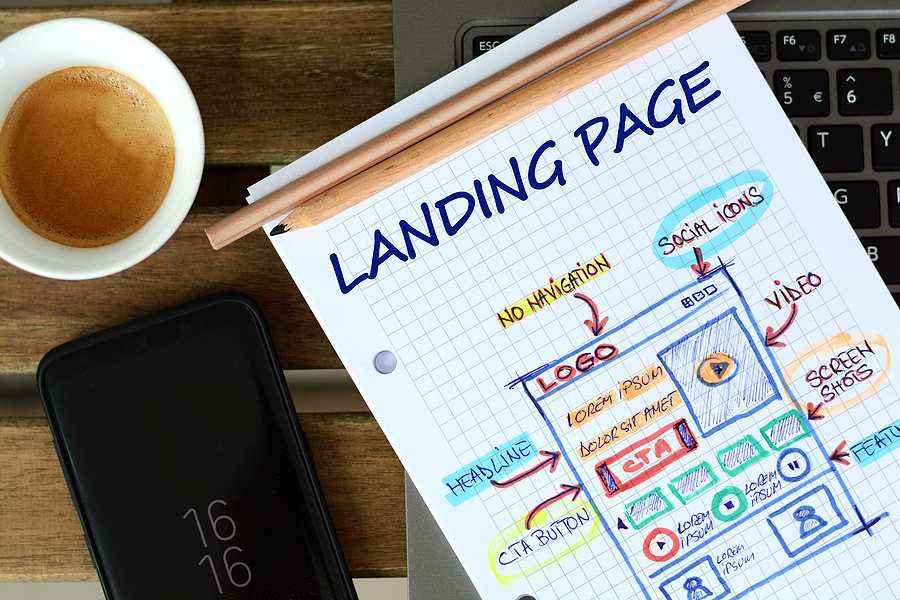
If your Google Ads generate clicks but users aren’t converting, your landing page may have issues.
A slow, confusing, or irrelevant landing page can cause visitors to bounce within seconds, resulting in wasted ad spend and zero results.
Common landing page mistakes that kill conversions
❌ Slow Load Times – Half of the visitors leave if a page takes longer than three seconds to load. Speed is essential.
❌ Poor Design & User Experience – Cluttered layouts, hard-to-read text, and confusing navigation make visitors lose interest.
❌ Irrelevant or Weak Content – If your landing page doesn’t match your ad promise, visitors feel misled and leave
❌ Excessive Distractions – Numerous CTAs, pop-ups, or irrelevant links can confuse visitors and decrease conversions.
How to fix it and boost conversions
✅ Speed It Up – Use Google’s PageSpeed Insights to check your load time and optimize images, hosting, and code.
✅ Match Messaging – Your ad promised something—make sure your landing page delivers your targeted keywords in your headlines and copy so users know they are in the right spot.
✅ Keep It Simple and Focused – A clean design, a clear headline, and one primary CTA (like “Get a Free Quote”) work best.
✅ Optimize for Mobile – This is especially important if you rely on phone call leads from potential customers. Ensure your landing page loads quickly and that it’s easy for users to call or take the next step.
A high-performing landing page doesn’t just look good—it works seamlessly to turn clicks into customers.

Weak Call-to-Action (CTA)
If you’re not telling visitors what to do, they won’t do it!
Imagine walking into a store interested in a product, but there’s no one to guide you—no signs, no checkout counter, and no salesperson to help.
You’d probably leave, right?
Having a clear, compelling call-to-action (CTA) is like having a guide in a store. It’s a key element in guiding visitors towards conversion.
Why a weak or missing CTA kills conversions
🚫 Too Vague – “Learn More” or “Get Started” doesn’t create urgency or clarity. Visitors need to know what happens next.
🚫 Too Many Options – If there are multiple CTAs (sign up, download, call, buy), visitors may get confused and take no action.
🚫 Not Visible Enough – If your CTA is buried in a wall of text or too far down the page, people won’t see it.
How to fix it and get more conversions
✅ Make It Clear & Actionable – Use direct, benefit-driven CTAs like:
- “Get Your Free Consultation”
- “Start Your 7-Day Trial”
- “Download the Guide Now”
✅ Create a Sense of Urgency – Phrases like “Limited Spots Available” or “Offer Ends Soon” push visitors to act now.
✅ Use Contrasting Colors – Your CTA button should stand out from the rest of the page.
✅ Reduce Friction – If your CTA leads to a form, keep it short and simple (name, email, and one key question).
Budgeting and bidding issues
Spending too much or too little? Your budget could be holding you back. Google Ads budgeting and bidding aren’t just about how much you spend—they’re about how wisely you allocate your budget.
A poor strategy may drain your budget too fast or make your ads invisible to potential customers.
Common budgeting and bidding mistakes that hurt performance
🚫 Setting a budget that is too low—If your daily budget is less than your industry’s average cost-per-click (CPC), your ads will not receive enough exposure to generate meaningful conversions.
🚫 Running out of budget too early—If your budget is exhausted by noon, you’re missing out on prime search traffic in the afternoon and evening.
🚫 Overreliance on automated bidding—Smart Bidding can be helpful, but without proper oversight, it might prioritize clicks over conversions, wasting ad spend on low-intent users.
🚫 Not adjusting for high-performing keywords—Treating all keywords equally can result in spending too much on underperformers and not enough on high-converting ones.
🚫 Not tracking conversions correctly—To truly take advantage of Google’s Smart Bidding for conversions, you must send conversion data to Google. Better yet, you can now let Google know which leads are qualified, giving it a better idea of the leads you’re after.
🚫 Not tracking the complete buyer’s journey—Many Internet transactions are not one-and-done, especially in B2B. There are often many layers of decision-makers, and it may take some time for a lead to transform into a sale. Measuring the stages of the buyer’s journey and how Google Ads can support them is essential for adequately calculating ROI.
How to fix your budget & bidding strategy
✅ Use a Competitive Budget – Research the average CPC in your industry and set a budget that allows for enough daily clicks to drive conversions.
✅ Optimize Bidding for Conversions, Not Just Clicks – Use Target CPA (Cost Per Acquisition) or ROAS (Return on Ad Spend) instead of just focusing on maximizing clicks.
✅ Regularly Review & Reallocate Spend – Monitor your campaigns weekly to shift more budget toward top-performing ads and keywords while cutting waste.
A wise budget and bidding strategy ensure that you spend the right amount to reach the right audience, maximizing ROI instead of just burning through ad dollars.
Competition and marketing saturation
When everyone’s competing for the same audience, how do you stand out?
In highly competitive industries, Google Ads can feel like a bidding war—and if you’re not strategic, you’ll spend more for fewer conversions.
When multiple businesses target the same keywords, costs rise, making it harder to grab attention.
How market saturation hurts your Google Ads performance
Higher Cost-per-Click (CPC) – The more competitors bidding on the same keywords, the more expensive clicks become.
Ad Fatigue – If prospects repeatedly see the same types of ads, they start ignoring them.
Low Ad Visibility – If competitors outbid you, your ads might not show up at all—or only in lower positions with less impact.
How to Compete in a Crowded Market & Improve Conversions
Instead of outspending competitors, focus on outsmarting them with better targeting, messaging, and landing page experiences that drive higher conversions.
✅ Target Long-Tail Keywords – Instead of broad, high-competition keywords like “digital marketing services,” go for more specific searches like “B2B content marketing strategy for SaaS.”
✅ Refine Your Unique Selling Proposition (USP) – Your ad copy should highlight what makes you different—pricing, expertise, or a unique offering.
✅ Leverage Retargeting – Stay top-of-mind by retargeting visitors who didn’t convert the first time.
✅ Optimize Your Landing Pages for Conversion – Even in a competitive market, a well-optimized landing page can convert better than a competitor’s generic one.
✅ Focus on Improving Quality Scores—Higher quality scores win. Focus on top-performing keywords and do what you can to improve quality scores (improve CTR and landing page experience).

Diagnosing your current Google Ads campaign
Before making any changes to your Google Ads strategy, you must understand what’s working and what’s not.
The key to improving conversions lies in analyzing the right performance metrics—because if you’re not measuring, you’re guessing.
Important Google Ads metrics to track
Tracking and understanding these key metrics helps you identify weak spots, make data-driven decisions, and optimize for higher conversions without wasting ad dollars.
Click-Through Rate (CTR)
Measures how often people click your ad after seeing it.
- Formula: (Clicks ÷ Impressions) × 100
- Why It Matters: A low CTR means your ad copy or targeting might not be relevant to users.
Cost-Per-Click (CPC)
The average amount you pay per click on your ad.
- Why It Matters: High CPCs can quickly drain your budget, especially if the clicks aren’t leading to conversions.
Conversion Rate (CVR)
The percentage of visitors who take the desired action (sign up, buy, request a demo, etc.).
- Formula: (Conversions ÷ Clicks) × 100
- Why It Matters: A low conversion rate means people are clicking but not taking action—often due to poor landing pages, irrelevant offers, or weak CTAs.
Cost-Per-Acquisition (CPA)
How much it costs to acquire a new lead or customer.
- Formula: (Total Ad Spend ÷ Conversions)
- Why It Matters: A high CPA means spending too much to get results, and your ads might need better targeting or optimization.
Quality Score
Google’s rating (1-10) of your ad based on relevance, expected CTR, and landing page experience.
- Why It Matters: A low Quality Score can lead to higher costs and lower ad rankings, making your ads less effective.
Impression Share
The proportion of times your ad shows in relation to the total number of searches available for your keywords.
- Why It Matters: A low impression share means competitors are outbidding you, limiting your ad’s visibility.
How to Use These Metrics to Improve Your Ads
✅ Low CTR? Enhance ad copy, incorporate emotional triggers, or refine targeting.
✅ High CPC? Optimize bids, boost Quality Score, and concentrate on long-tail keywords.
✅ Low Conversion Rate? Improve landing pages, fine-tune offers, and test various CTAs.
✅ High CPA? Revise bidding strategy, enhance ad targeting, and remove unproductive keywords.
✅ Low Impression Share? Raise budget, optimize bids, or experiment with new keyword variations.
Advanced tips & strategies
If your Google Ads are set up correctly but still don’t deliver the desired results, it’s time to take them to the next level.
You can refine your strategy, improve efficiency, and maximize conversions by leveraging remarketing, automation, and cross-channel marketing.
Let’s explore advanced tactics to help you get the most out of your ad spend.
Leverage remarketing campaigns
Not everyone converts the first time they click on your ad. That’s where remarketing comes in—it allows you to re-engage past visitors and nudge them toward conversion.
Why remarketing works
Target users with high intent – These visitors have already expressed interest, making them more likely to convert.
Keeps your brand top-of-mind – Even if they didn’t buy the first time, repeated exposure increases the chances of conversion.
Customizable audience segments – You can customize ads based on user behavior, like cart abandoners or individuals who visited a pricing page.
How to use remarketing effectively
✅ Segment Your Audience – Display different ads to visitors based on where they left the funnel.
✅ Offer an Incentive – Discounts, free trials, or exclusive content can encourage users to return.
✅ Use Dynamic Remarketing – Present users with the exact products or services they looked at.
Utilize Automation & AI
Google’s machine learning tools can help automate bidding, targeting, and even ad creative, saving you time and improving efficiency.
Best AI & automation features in Google Ads
- Smart Bidding – Uses AI to automatically adjust bids for maximum conversions based on real-time data.
- Responsive Search Ads (RSAs) – Google automatically tests different headlines and descriptions to find the best-performing combinations.
- Automated Audience Targeting – Uses machine learning to adjust targeting based on user behavior and conversion likelihood.
How to use automation without losing control
✅ Monitor AI Performance Regularly – Don’t rely solely on automation—track and adjust settings as needed.
✅ Use Smart Bidding Strategically – Test Target CPA (Cost Per Acquisition) or ROAS (Return on Ad Spend) bidding to see what works best for your campaign.
✅ Combine AI with Manual Adjustments – While AI is powerful, fine-tuning elements like ad copy and landing pages still require human oversight.

Integrate cross-channel marketing
Your customers use multiple platforms. Your ads should, too!
Google Ads work best when combined with other digital marketing channels, creating a seamless customer journey.
How to align Google Ads with other channels
- SEO & Content Marketing – Drive organic traffic and retarget those users with Google Ads.
- Social Media Ads – Use Facebook & LinkedIn Ads alongside Google Ads for broader reach and brand awareness.
- Email Marketing – Acquire leads from Google Ads and nurture them through email campaigns.
- YouTube Ads – Reinforce your message with video ads for stronger brand recall.
Why cross-channel marketing works
✔ Increases Touchpoints – The more often a prospect encounters your brand, the more likely they are to convert.
✔ Diversify Traffic Sources—Relying on a single channel can be risky; diversify your efforts for better results.
✔ Creates a Unified Brand Experience – Consistency across platforms fosters trust and recognition.
Get the right clicks that convert.
Achieving success with Google Ads takes time. The key is to continuously analyze, test, and refine your strategy.
- A/B test different ad variations to see what resonates.
- Monitor key metrics like CTR, CPC, and conversion rate.
- Adjust bids, audience targeting, and landing pages based on performance.
Every campaign is a chance to learn—the more you experiment, the better your results will be.
Ready for your Google Ads to achieve better conversions and higher ROI?
📩 Let’s chat! Contact us for a free campaign audit and expert recommendations.
💬 Have a question? Drop a comment below, and let’s discuss!
Recent Comments